
Hallo ich bin Linda, Ihre digitale Assistenz. Ich unterstütze Sie gerne bei Fragen zu unseren Produkten und Services.
Ich habe bemerkt, dass Sie im Menü nicht das Richtige gefunden haben. Sollen wir gemeinsam versuchen, eine Lösung für Ihr Anliegen zu finden?
Chat jetzt startenHallo, ich habe festgestellt, dass Sie etwas suchen. Gerne bin ich Ihnen bei der Suche behilflich.
Chat jetzt startenHallo, benötigen Sie eventuell Hilfe beim Login ins Online-Banking? Gerne helfe ich Ihnen über den Chat weiter.
Chat jetzt startenHallo ich bin Linda, Ihre digitale Assistenz. Ich unterstütze Sie gerne bei Fragen zu unseren Produkten und Services.
Hallo ich bin Linda, Ihre digitale Assistenz. Ich unterstütze Sie gerne bei Fragen zu unseren Produkten und Services.
Now switch to the pushTAN approval procedure – and follow these simple instructions. You can then use the pushTAN procedure immediately.
Important: Please prepare everything you need for the setup. You will find all the essentials in the following section.
Tip: Start the setup process on your device and keep an eye on the instructions at the same time – preferably with a second device.
S-pushTAN-App
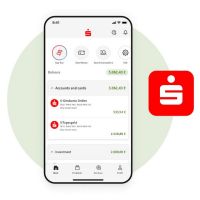
For your online banking, you need the S-pushTAN-App to approve orders securely and with ease. Download the latest version of the app for free – from the Apple App Store or Google Play Store.
chipTAN generator
To enable the switch from chipTAN to pushTAN, you need your chipTAN generator.
Sparkassen-Card (debit card) – card number
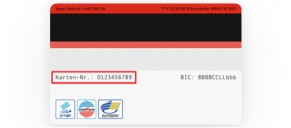
Please have your Sparkassen-Card (debit card) ready. You will be asked to enter your card number. You will find the number on the back.
Important: Please prepare everything you need for the setup. You will find all the essentials in the following section.
Tip: Start the setup process on your device and keep an eye on the instructions at the same time – preferably with a second device.
For your online banking, you need the S-pushTAN-App to approve orders securely and with ease. Download the latest version of the app for free – from the Apple App Store or Google Play Store.
To enable the switch from chipTAN to pushTAN, you need your chipTAN generator.
Please have your Sparkassen-Card (debit card) ready. You will be asked to enter your card number. You will find the number on the back.
Important: Make sure that you have already installed and opened the S-pushTAN-App and set a password to change the approval procedure.
You want to switch from the chipTAN procedure to the pushTAN approval procedure. The following instructions explain exactly what to do.
Note: The procedure is shown as an example and may vary slightly depending on the mobile device or Sparkasse institution.
Important: Make sure that you have already installed and opened the S-pushTAN-App and set a password to change the approval procedure.
You want to switch from the chipTAN procedure to the pushTAN approval procedure. The following instructions explain exactly what to do.
Note: The procedure is shown as an example and may vary slightly depending on the mobile device or Sparkasse institution.
Find Tutorials in English
Do you need help with your online banking? Simply use our clear step-by-step instructions.
Looking for help with something else? The practical guides cover everything you need to know about online banking and our Sparkasse products.
Im deutschlandweiten Focus Money CityContest 2025 erhielt die Sparkasse Ansbach den Titel „Testsieger“ in Beratung und Service im Bereich Baufinanzierung.
Wir, als Ihre Sparkasse, verwenden Cookies, die unbedingt erforderlich sind, um Ihnen unsere Website zur Verfügung zu stellen. Wenn Sie Ihre Zustimmung erteilen, verwenden wir zusätzliche Cookies, um zum Zwecke der Statistik (z.B. Reichweitenmessung) und des Marketings (wie z.B. Anzeige personalisierter Inhalte) Informationen zu Ihrer Nutzung unserer Website zu verarbeiten. Hierzu erhalten wir teilweise von Google weitere Daten. Weiterhin ordnen wir Besucher über Cookies bestimmten Zielgruppen zu und übermitteln diese für Werbekampagnen an Google. Detaillierte Informationen zu diesen Cookies finden Sie in unserer Erklärung zum Datenschutz. Ihre Zustimmung ist freiwillig und für die Nutzung der Website nicht notwendig. Durch Klick auf „Einstellungen anpassen“, können Sie im Einzelnen bestimmen, welche zusätzlichen Cookies wir auf der Grundlage Ihrer Zustimmung verwenden dürfen. Sie können auch allen zusätzlichen Cookies gleichzeitig zustimmen, indem Sie auf “Zustimmen“ klicken. Sie können Ihre Zustimmung jederzeit über den Link „Cookie-Einstellungen anpassen“ unten auf jeder Seite widerrufen oder Ihre Cookie-Einstellungen dort ändern. Klicken Sie auf „Ablehnen“, werden keine zusätzlichen Cookies gesetzt.